Templates Events
Login

- In the Username Selector section, Choose from any of these selectors - CSS Selector/X Path/Id and key in the corresponding Path/Id
-
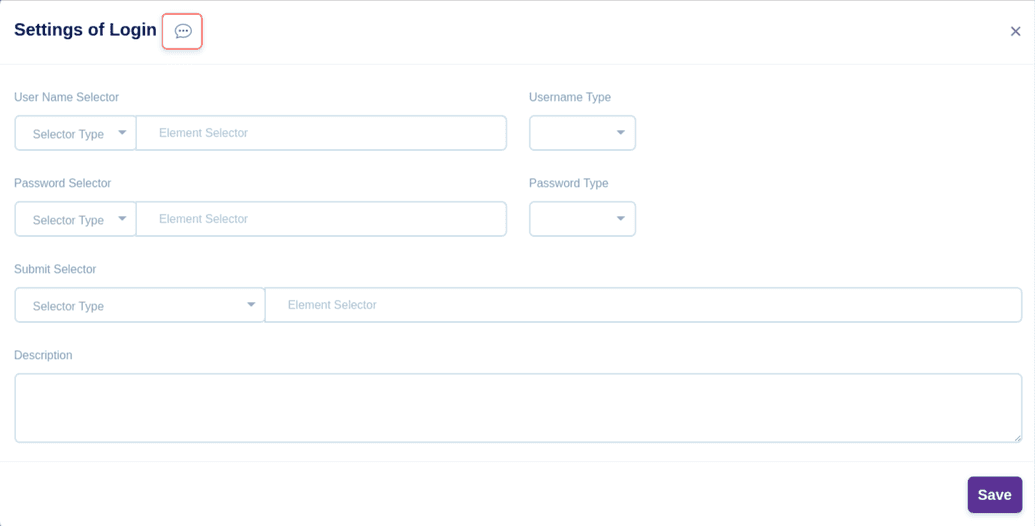
- Choose any of these Username type Variable/Value
- For Variable, key in the Variable Name
- For Value, Choose the Data type, either String/Number/Keys, key in the corresponding Value accordingly
- In the Password Selector section, Choose from any of these selectors - CSS Selector/X Path/Id and key in the corresponding Path/Id
- Choose any of these Password type Variable/Value
- For Variable, key in the Variable Name
- For Value, Choose the Data type, either String/Number/Keys, key in the corresponding Value accordingly
- In the Submit Selector section, Choose from any of these selectors - CSS Selector/X Path/Id and key in the corresponding Path/Id
- In the description box, you can give a short description for your reference
- Click the Save button to save this event
